RTW (UK) - British & Irish
- Understanding UK Right to Work checks
- Digital Right to Work checks for British and Irish citizens – Powered by Yoti
- Digital Right to Work check costs and billing
- Enabling and completing digital Right to Work checks
- Recording and managing manual Right to Work checks
- Viewing and monitoring digital Right to Work check results
Understanding UK Right to Work checks
Employers in the UK are legally required to verify that individuals have the right to work before they begin employment. These checks establish whether someone is legally permitted to work in the UK.
Digital Right to Work checks
Digital Right to Work checks provide a simple, secure and convenient way to verify an individual's identity without needing to physically inspect their passport.
Digital verification is available to eligible British and Irish citizens holding a valid British or Irish passport, or an Irish passport card.
Eligible workers can complete their identity verification remotely, removing the need to arrange face-to-face document checks and making the process significantly easier for both employers and staff.
Digital verification offers several advantages:
- Remote verification – Staff can complete checks without attending an in-person appointment.
- Faster onboarding – Reduce delays associated with physically inspecting documents.
- Fraud detection – Specialist identity verification technology helps detect potentially forged, altered or fraudulent identity documents.
- Greater identity assurance – Digital document authentication and identity-matching technology help reduce the risk of impersonation and identity fraud.
- Reduced administration – Simplify verification and minimise manual document handling.
- Greater peace of mind – Provide employers with additional confidence that identity documents have undergone specialist verification rather than relying solely on visual inspection.
Our platform integrates directly with Yoti, a certified digital identity verification provider, allowing eligible digital Right to Work checks to be completed and managed within the system.
For more information, see Digital Right to Work checks powered by Yoti.
Are digital Right to Work checks mandatory?
No. Digital Right to Work checks are not legally mandatory.
However, employers choosing manual checks take responsibility for physically inspecting original documents, assessing their authenticity, confirming they belong to the individual presenting them, and retaining the required dated evidence.
Forged passports, altered documents and identity fraud can be difficult to identify through visual inspection alone. Manual checks rely heavily on the person conducting them recognising potential warning signs and following the correct procedures.
Digital Right to Work checks provide an additional layer of protection through specialist document authentication and identity verification technology, helping reduce the risk of human error and fraudulent documentation.
For eligible workers, digital verification is strongly recommended, offering a more secure, consistent and convenient approach while giving employers greater confidence in their Right to Work checking process.
Digital Right to Work checks for British and Irish citizens – Powered by Yoti
We've integrated Yoti's certified digital identity verification technology directly into WiseOS, making it faster, easier and more secure to complete digital Right to Work (RTW) checks without leaving your platform.
Eligible workers can verify their identity remotely, while your team can initiate checks, monitor progress and access verification results directly from their staff profiles.
Why use Yoti through WiseOS rather than directly?
Yoti provides the specialist identity verification technology, but WiseOS brings the entire process together.
Rather than managing identity checks separately from your workforce operations, our integration connects verification directly with onboarding, staff records and compliance monitoring, reducing administration and giving you greater control over your workforce.
End-to-end integration
Initiate and manage digital Right to Work checks directly within WiseOS. There's no need to access separate verification platforms, manually transfer results or duplicate information across systems.
Automatic compliance records
Completed verification results are automatically linked to the relevant staff profile, creating a centralised record of each check.
This makes it easier to retrieve verification evidence, maintain audit trails and demonstrate that appropriate checks have been carried out during internal reviews or compliance inspections.
Faster, more convenient onboarding
Workers can complete their digital identity verification remotely, without needing to attend an appointment or physically present their passport.
This helps reduce onboarding delays, particularly when recruiting large numbers of workers across multiple locations.
Greater protection against identity fraud
Yoti uses specialist identity verification technology to help detect potentially forged or altered documents and identify possible impersonation.
This provides an additional level of assurance beyond visual document inspection, helping reduce the risk of human error and giving employers greater confidence in their verification process.
Real-time verification visibility
Monitor digital Right to Work verification statuses directly within WiseOS, making it easier to identify outstanding checks, review completed verifications and follow up with workers who have not yet completed the process.
One connected workforce management process
Digital Right to Work verification becomes part of your wider workforce management process rather than a separate administrative task.
By connecting verification with staff onboarding, compliance records and workforce scheduling, WiseOS helps eliminate fragmented workflows, reduce duplicate data entry and keep important information accessible in one place.
The real advantage isn't simply completing a digital identity check. It's having the entire verification process connected to the system you already use to manage your workforce.
Digital Right to Work check costs and billing
Digital Right to Work checks cost a maximum of £4.50 per check, with charges billed at the end of each month.
This includes Yoti's certified digital identity verification service and its full integration into the platform, allowing checks to be initiated, tracked and securely stored within individual staff profiles.
The integration provides several benefits:
- Seamless verification – Initiate and manage digital Right to Work checks directly from staff profiles.
- Reduced administration – Eliminate the need to manage checks across separate systems.
- Centralised record-keeping – Keep verification results and supporting records together within each staff profile.
- Compliance monitoring – Track verification statuses and identify checks requiring attention.
The cost covers more than the digital verification itself, providing an integrated process that simplifies Right to Work management and reduces administrative workload.
Enabling and completing digital Right to Work checks
Digital Right to Work checks can be enabled through a staff profile, allowing eligible British and Irish citizens to complete their identity verification remotely through Yoti.
Enabling digital Right to Work checking
To enable digital Right to Work checking:
- Open any staff profile.
- Navigate to the ID & Right to Work tab and locate the Right to Work status section.
- Click Enable Right to Work Checking.
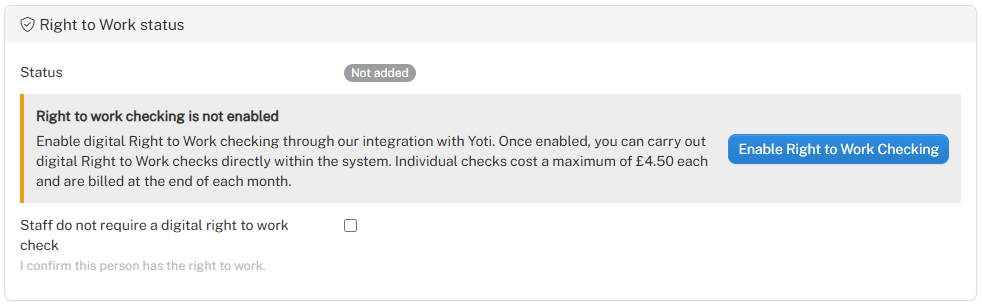
Once enabled, digital Right to Work checking becomes available across the organisation, and the system displays a confirmation that the integration is active.
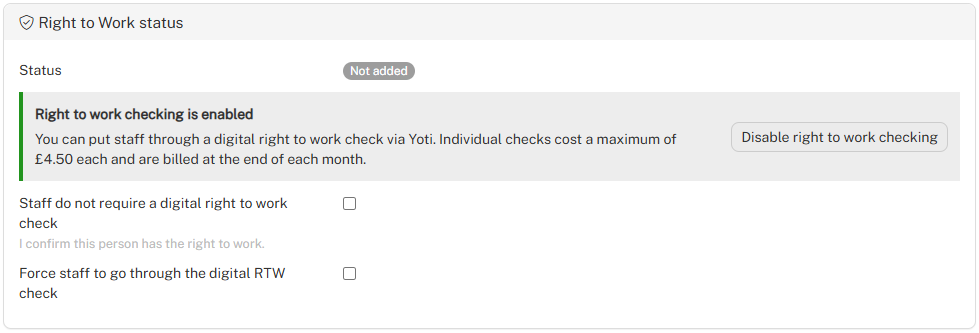
Requiring staff to complete a digital Right to Work check
To require an individual to complete digital verification:
- Open the relevant staff profile.
- Navigate to ID & Right to Work > Right to Work status.
- Tick Force staff to go through the digital RTW check.
- Click on Save.
This checkbox must be selected individually on every staff profile where digital verification is required.
Once selected, the staff member will be guided through the Yoti verification process the next time they log into their staff area.
Completing the digital Right to Work check
When the staff member next logs into their staff area, they will be prompted to complete their digital Right to Work verification through Yoti.
The process involves:
- Passport verification – The staff member captures or uploads an image of their eligible passport.
- Facial verification – Yoti guides the staff member through a facial scan to verify their identity against their passport.
- Submission – Once completed, the verification is submitted for processing.
The verification results are then made available within the individual's staff profile, allowing administrators to review their Right to Work status.
Disabling digital Right to Work checking
A Main Admin can disable the integration by selecting Disable right to work checking.
Disabling the integration affects the entire organisation, not just the staff member whose profile is currently open.
Recording and managing manual Right to Work checks
Where an employer has physically met an individual and verified their original British or Irish passport in person, they can record this verification within the staff profile without requiring an additional digital Right to Work check.
Recording manual verification
To record that a manual Right to Work check has been completed:
- Open the relevant staff profile.
- Navigate to ID & Right to Work and locate the Right to Work status section.
Select Staff do not require a digital right to work check to confirm that you have personally verified the individual's Right to Work.
Adding supporting evidence
You can also upload additional passport images and photographs taken during the in-person verification, including photographs of the individual holding their passport or standing alongside the person conducting the check.
These records can help demonstrate during an audit that the individual was met in person and their documents were physically inspected.
Viewing and monitoring digital Right to Work check results
Digital Right to Work checks are typically completed within 24–48 hours. Administrators can monitor the progress of checks through the dashboard and view individual verification results within staff profiles.
Monitoring checks on the dashboard
The dashboard provides an overview of digital Right to Work verification statuses across your workforce.
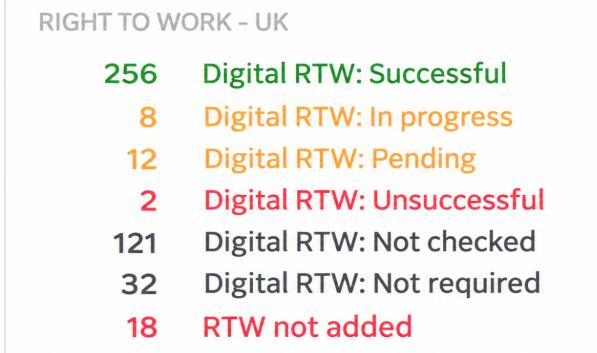
Click on any of the status categories to view a list of staff members whose checks fall within that category.
This allows administrators to identify outstanding checks and monitor verification progress.
Viewing results in staff profiles
To view an individual's digital Right to Work verification status:
- Open the relevant staff profile.
- Navigate to ID & Right to Work and locate the Right to Work status section.


The individual's digital Right to Work check status and results can be viewed here.
Email notifications
An email notification is automatically sent to the notification email address configured in the system when a digital Right to Work check has been completed successfully or has failed.
This allows administrators to stay informed of verification outcomes without needing to continually monitor the dashboard.